
Introduction
Estimated delivery dates in Shopify help customers know when their orders are expected to arrive before completing a purchase. Displaying accurate delivery estimates builds customer trust, reduces uncertainty, and can improve conversion rates.
One of the most common questions online shoppers ask before placing an order is, “When will my order arrive?” If your Shopify store doesn’t provide a clear answer, customers may hesitate to purchase, abandon their carts, or contact your support team for updates.
Displaying estimated delivery dates in Shopify helps eliminate uncertainty and gives shoppers confidence in their purchasing decisions. Whether you run a dropshipping business, a print-on-demand store, or a traditional eCommerce brand, accurate delivery estimates can improve transparency, customer satisfaction, and conversion rates.
In today’s competitive eCommerce landscape, delivery expectations play a major role in the buying journey. Customers want to see delivery timelines before they reach checkout. By displaying estimated delivery information on product pages, cart pages, and checkout pages, merchants can improve customer experience, reduce support inquiries, and boost sales.
This guide explains how to display estimated delivery dates in Shopify, explores the available methods, and shows why automated delivery date solutions are becoming essential for modern Shopify stores.
What Are Estimated Delivery Dates In Shopify?
Estimated delivery dates are projected arrival dates displayed to customers before they
complete a purchase. These dates help shoppers understand when an order is expected to
arrive based on processing time, fulfillment schedules, shipping methods, transit time,
business days, and carrier performance.
For example:
Order today and receive it between July 12–15.
Instead of providing vague shipping information, estimated delivery dates give customers a
realistic delivery range. This improves trust because shoppers know exactly what to expect
before placing an order.
Shopify merchants commonly display delivery estimates on:
- Product pages
- Collection pages
- Cart pages
- Checkout pages
- Order confirmation pages
How Shopify Estimated Delivery Dates Are Calculated
- Processing time
- Fulfillment time
- Transit time
- Shipping rate
- Business days
- Holidays
- Carrier performance
- Order cut-off time
When customers see accurate delivery information, they feel more comfortable completing
a purchase because they have visibility into the fulfillment process.
Why Showing Estimated Delivery Dates Is Important
How Estimated Delivery Dates Build Customer Trust
Trust is one of the most important factors in eCommerce. Customers are more likely to
purchase from a store that provides transparent information about shipping and delivery.
Showing accurate delivery information demonstrates professionalism and helps shoppers
feel confident that their order will arrive within the expected timeframe.
How Estimated Delivery Dates Reduce Cart Abandonment
Cart abandonment is often caused by uncertainty. Customers may find a product they want
but leave because they cannot determine how long delivery will take.
Displaying estimated arrival information removes uncertainty and encourages customers to
complete their purchases.
How Estimated Delivery Dates Improve Conversion Rates
Delivery information acts as a conversion driver. Customers who can see realistic arrival
timelines are more likely to proceed through checkout.
This is especially important when shoppers are purchasing gifts, seasonal products, or time-
sensitive items.
How Estimated Delivery Dates Enhance Customer Experience
Customer experience extends beyond product quality and pricing. Delivery transparency is
a critical part of the online shopping journey.
Providing accurate delivery expectations helps customers feel informed and reduces
anxiety about order fulfillment.
How Estimated Delivery Dates Reduce Customer Support Questions
Many support requests are related to shipping status and delivery expectations.
Questions such as:
- Where is my order?
- When will my package arrive?
- How long does shipping take?
can often be prevented by displaying accurate delivery information before checkout.
Method 2: Add Delivery Dates Using Shopify Theme Code
Store owners with technical knowledge can manually display delivery information by editing
Shopify theme files.
While this method offers flexibility, it requires ongoing maintenance whenever shipping
conditions change.
Method 3: Use Custom Development
Large stores sometimes create custom delivery calculation systems using Shopify Functions
and custom development.
Although powerful, this approach requires developer resources, testing, and ongoing
management.
How to Add Estimated Delivery Dates Using a Shopify App
Using a dedicated Shopify app is the fastest and most beginner-friendly method.
Step 1: Open Shopify Admin
Log in to your Shopify Admin dashboard and navigate to the Apps section.
Step 2: Visit the Shopify App Store
Search for a delivery date app that supports shipping rules, business-day calculations, order
cut-off times, and delivery ranges.
Step 3: Install the App
Choose a solution that matches your store requirements and install it.
Step 4: Configure Delivery Settings
Set up:
- Processing time
- Fulfillment time
- Shipping days
- Holidays
- Delivery ranges
- Business days
- Cut-off times
Step 5: Publish Delivery Estimates
Enable the delivery widget and display delivery information on product pages, cart pages,
checkout pages, and order confirmation pages.
Methods to Display Estimated Delivery Dates in Shopify
There are several ways to display delivery estimates in Shopify.
Method 1: Use a Shopify Delivery Date App
Using a dedicated Shopify app is the easiest solution for most merchants.
These apps automatically calculate delivery estimates using:
- Processing time
- Shipping rules
- Transit time
- Business days
- Holidays
- Cut-off times
- Delivery ranges
Most apps require little setup and can display delivery information throughout the
customer journey.
Method 2: Add Delivery Dates Using Shopify Theme Code
Store owners with technical knowledge can manually display delivery information by editing Shopify theme files.
While this method offers flexibility, it requires ongoing maintenance whenever shipping
conditions change.
Method 3: Use Custom Development
Large stores sometimes create custom delivery calculation systems using Shopify Functions
and custom development.
Although powerful, this approach requires developer resources, testing, and ongoing
management.
How to Add Estimated Delivery Dates Using a Shopify App
Using a dedicated Shopify app is the fastest and most beginner-friendly method.
Step 1: Open Shopify Admin
Log in to your Shopify Admin dashboard and navigate to the Apps section.
Step 2: Visit the Shopify App Store
Search for a delivery date app that supports shipping rules, business-day calculations, order
cut-off times, and delivery ranges.
Step 3: Install the App
Choose a solution that matches your store requirements and install it.
Step 4: Configure Delivery Settings
Set up:
- Processing time
- Fulfillment time
- Shipping days
- Holidays
- Delivery ranges
- Business days
- Cut-off times
Step 5: Publish Delivery Estimates
Enable the delivery widget and display delivery information on product pages, cart pages,
checkout pages, and order confirmation pages.
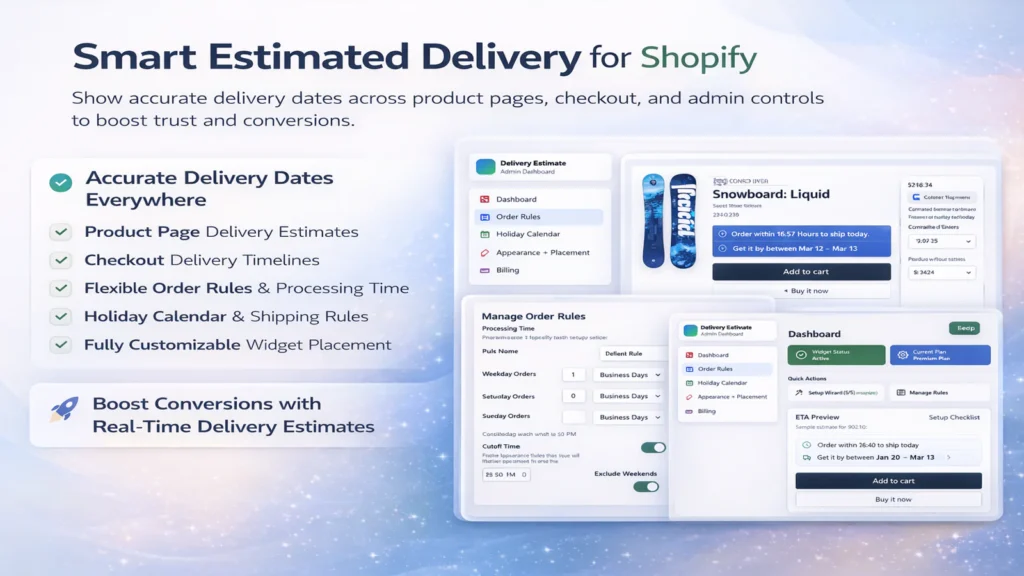
Caption: Example of estimated delivery dates displayed on a Shopify product page using
AIT Estimated Delivery Date.
Best Shopify App for Estimated Delivery Dates
For merchants looking for a reliable solution, AIT Estimated Delivery Date provides an
easy way to display accurate delivery information across Shopify stores.
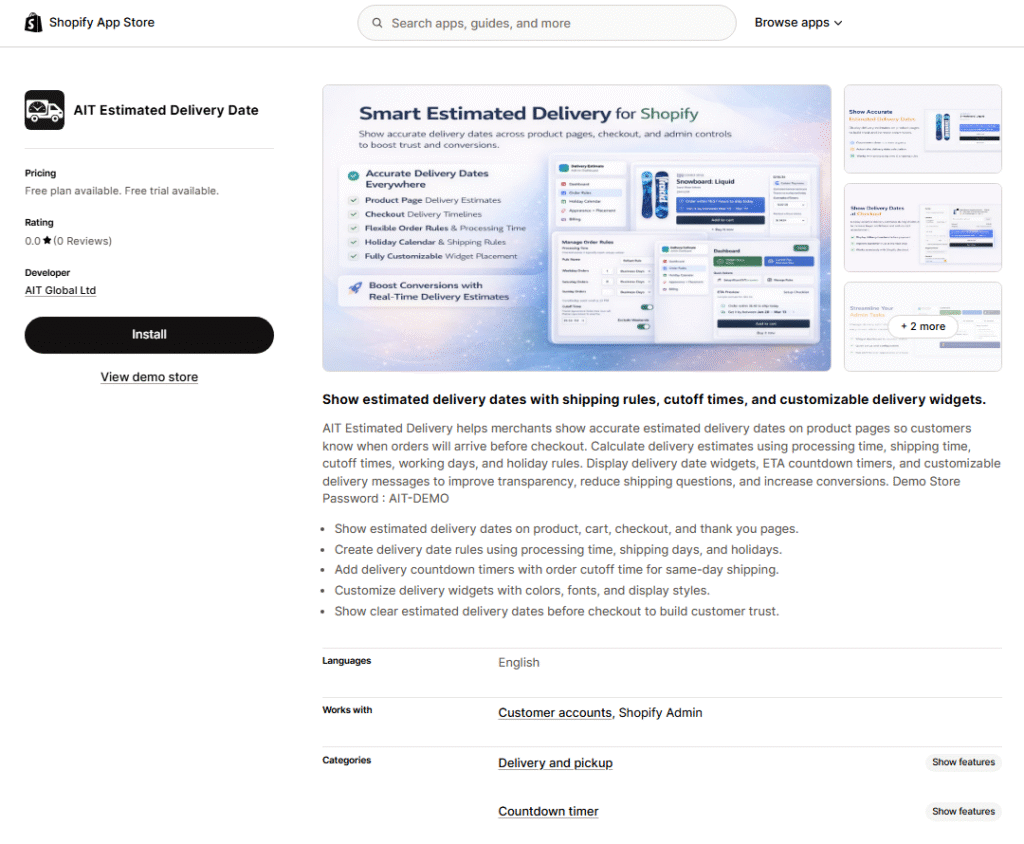
Caption: AIT Estimated Delivery Date app available on the Shopify App Store.
Why Choose AIT Estimated Delivery Date?
AIT Estimated Delivery Date helps merchants display estimated delivery dates
automatically without relying on manual delivery dates.
The app combines fulfillment time, transit time, processing time, shipping rules, delivery
ranges, business days, and order cut-off times to generate accurate delivery estimates
throughout the shopping journey.
AIT Estimated Delivery Date allows merchants to display both estimated delivery dates and
estimated delivery times using real shipping rules, fulfillment schedules, business days, and
shipping rates. The app automatically calculates a delivery date range and can display
delivery information on product pages, checkout pages, cart pages, and order confirmation
pages, helping merchants create a more transparent customer experience.
Key Features
- Display delivery estimates on product pages
- Show delivery dates at checkout
- Configure shipping rules
- Manage delivery ranges
- Support fulfillment time calculations
- Support transit time calculations
- Handle business days and holidays
- Create delivery timelines
- Configure order cut-off times
- Improve customer experience
- Reduce shipping-related support requests
By automating delivery estimates, merchants can provide more accurate shipping
information while reducing operational effort.
Delivery Dates at Checkout vs Product Pages
Customers prefer seeing delivery information as early as possible during the shopping
journey.
While displaying delivery dates at checkout is helpful, showing delivery information directly
on product pages often creates a better customer experience.
When shoppers can view estimated shipping information before reaching checkout, the
are more likely to trust the store and continue with their purchase.
Many successful stores display delivery information on both product pages and checkout
pages. This approach helps reduce uncertainty and keeps customers informed throughout
the purchasing process.
Understanding Delivery Time and Shipping Rates
Delivery time plays an important role when calculating accurate arrival estimates. While
many merchants focus on fulfillment time and transit time, shipping rates can also influence
delivery speed and customer expectations.
Different shipping rates often correspond to different shipping services. For example,
express shipping may offer a shorter delivery time compared to standard shipping options.
When customers can see both delivery time and shipping costs before checkout, they can
make more informed purchasing decisions.
Using accurate shipping rate information alongside delivery estimates helps improve
transparency and provides a better customer experience. It also allows merchants to set
realistic delivery expectations and reduce potential confusion after an order has been
placed.
Shopify Estimated Delivery Date vs Estimated Delivery Time
Many merchants use the terms Shopify estimated delivery date and estimated delivery time
interchangeably, but there is a slight difference between the two.
A Shopify estimated delivery date focuses on the expected arrival day or delivery range.
Estimated delivery time refers to the total amount of time required for processing,
fulfillment, and shipping.
For example, a store may display an estimated delivery date of June 29–July 1 while the
estimated delivery time is 5–7 business days. By displaying both estimated delivery dates
and estimated delivery times, merchants can provide customers with a clearer
understanding of when orders are expected to arrive.
This additional clarity improves customer confidence and helps reduce support requests
related to shipping and order tracking.
Displaying Delivery Dates on Your Shopify Store
Displaying a delivery date on your Shopify store helps create transparency throughout the
shopping journey. Merchants can show delivery information on product pages, cart pages,
checkout pages, and order confirmation pages.
Many stores display a date range rather than a single delivery day to improve accuracy. A
date range provides flexibility while still giving customers realistic delivery expectations.
When delivery information is visible across the entire customer journey, shoppers feel more
confident completing their purchases. This can lead to higher conversion rates, fewer|
abandoned carts, and a better overall customer experience.
Whether you choose a manual setup or an automated solution, displaying delivery
information consistently across your Shopify store can improve trust and reduce customer
uncertainty.
How Shopify Merchants Calculate Accurate Delivery Estimates
Accurate delivery estimates are based on multiple factors rather than a single shipping
speed.
Most Shopify merchants calculate delivery dates using:
- Fulfillment time
- Transit time
- Shipping rate
- Business days
- Carrier performance
- Processing time
- Delivery ranges
For example, a store may require two business days for order processing and an additional
three to five business days for shipping. In this situation, the delivery information shown to
customers should reflect both fulfillment time and transit time rather than shipping speed
alone.
Many modern stores also use date range calculations and cut-off time rules. Orders placed
before a specific cut-off time may be processed on the same day, while later orders are
processed on the next business day.
To improve customer experience, merchants often display estimates on product pages,
checkout pages, and order confirmation pages. Showing delivery information throughout
the customer journey helps set realistic expectations and reduces uncertainty before
purchase.
Automated systems can generate delivery dates based on shipping performance and
operational data. Compared with manual delivery dates, automated delivery dates provide
more accurate information and require less ongoing maintenance.
Factors That Affect Delivery Date Estimates
Fulfillment Time
The amount of time required to prepare and process an order before shipment.
Transit Time
The time needed for the carrier to transport the package to the customer.
Business Days
Weekends and holidays can significantly affect delivery timelines.
Shipping Rules
Different shipping methods and destinations may require different calculations.
Carrier Performance
Actual carrier performance often affects the final delivery timeline.
Delivery Ranges
Many merchants display a delivery range rather than a single date to improve accuracy.
Automated Delivery Dates vs Manual Delivery Dates
Many merchants begin with manual delivery dates. However, as order volume increases,
maintaining manual delivery estimates becomes difficult.
Automated delivery dates offer several advantages:
- More accurate delivery information
- Less manual work
- Dynamic updates
- Better customer experience
- Improved delivery expectations
- Easier scaling
Compared with manual delivery dates, automated delivery dates provide a more reliable
solution for growing stores.
Best Practices for Displaying Delivery Dates
Show Delivery Information Early
Display delivery estimates on product pages instead of waiting until checkout.
Use Business-Day Calculations
Avoid counting weekends and holidays when calculating delivery information.
Update Delivery Expectations Regularly
Carrier performance and shipping conditions change throughout the year.
Display Delivery Dates at Checkout
Customers should see delivery information before completing payment.
Offer Multiple Shipping Options
Different shipping methods should display different delivery ranges.
Common Mistakes to Avoid
Using Static Delivery Dates
Static dates quickly become inaccurate and misleading.
Ignoring Processing Time
Delivery calculations should include both processing time and shipping time.
Forgetting Holidays
Holiday schedules significantly impact delivery timelines.
Overpromising Delivery Speed
Unrealistic delivery expectations can damage customer trust.
Not Testing Delivery Calculations
Always verify delivery information before making it visible to customers.
Frequently Asked Questions
Does Shopify have built-in estimated delivery dates?
Shopify provides delivery-related settings, but many merchants use dedicated apps to
display dynamic delivery estimates throughout the customer journey.
Can I show delivery dates without an app?
Yes. Shopify themes can be customized using code. However, maintaining accurate delivery
information manually can become difficult as shipping conditions change.
Do delivery estimates improve conversion rates?
Yes. Accurate delivery information reduces uncertainty, improves trust, and helps
customers make faster purchasing decisions.
What is the difference between fulfillment time and transit time?
Fulfillment time refers to the period required to process and prepare an order before
shipment. Transit time refers to the time needed for the carrier to deliver the package after
it has been shipped.
What is the difference between manual delivery dates and automated delivery dates?
Manual delivery dates require merchants to update estimates whenever shipping
conditions change.
Automated delivery dates calculate estimates using fulfillment time, transit time, shipping
rules, business days, carrier performance, and processing time. This makes them more
accurate and easier to manage.
How are delivery dates calculated in Shopify?
Delivery dates are typically calculated using fulfillment time, transit time, business days,
carrier performance, shipping rules, processing time, shipping rates, and delivery ranges.
Many merchants use automated delivery date apps to ensure customers always see
accurate delivery estimates based on current shipping conditions.
Should estimated delivery dates be shown at checkout?
Yes. Displaying delivery dates at checkout helps customers understand when their orders
are expected to arrive before payment is completed. Many merchants also show delivery
estimates on product pages to improve customer confidence earlier in the shopping
journey.
What is the difference between estimated delivery dates and estimated delivery times?
Estimated delivery dates show the expected arrival day or date range for an order.
Estimated delivery times refer to the total time required for order processing, fulfillment,
and shipping. Displaying both can provide customers with a more complete understanding
of when their order will arrive.
Which Shopify app is best for estimated delivery dates?
The ideal solution depends on your store requirements. For merchants looking for
automated calculations, customizable widgets, shipping rules, delivery ranges, and checkout
visibility, AIT Estimated Delivery Date provides a complete solution.
Conclusion
Displaying estimated delivery dates in Shopify is one of the simplest ways to improve
transparency, customer trust, and conversion rates.
Customers want clear delivery expectations before placing an order, and providing accurate
delivery information helps remove uncertainty from the buying process.
Whether you choose custom development, theme modifications, or a dedicated Shopify app,
implementing delivery estimates can significantly improve customer experience and reduce
support inquiries.
Many merchants begin with manual delivery dates but eventually switch to automated
delivery dates as their stores grow. Automated solutions help maintain accurate delivery
timelines, improve customer experience, and ensure customers always receive realistic
delivery expectations.
For merchants looking for an automated solution, AIT Estimated Delivery Date offers an
easy way to manage fulfillment time, shipping rules, delivery ranges, transit time
calculations, and delivery estimates across the entire shopping journey.
By helping customers understand exactly when their orders will arrive, you can create a
more transparent shopping experience while increasing trust and conversions.